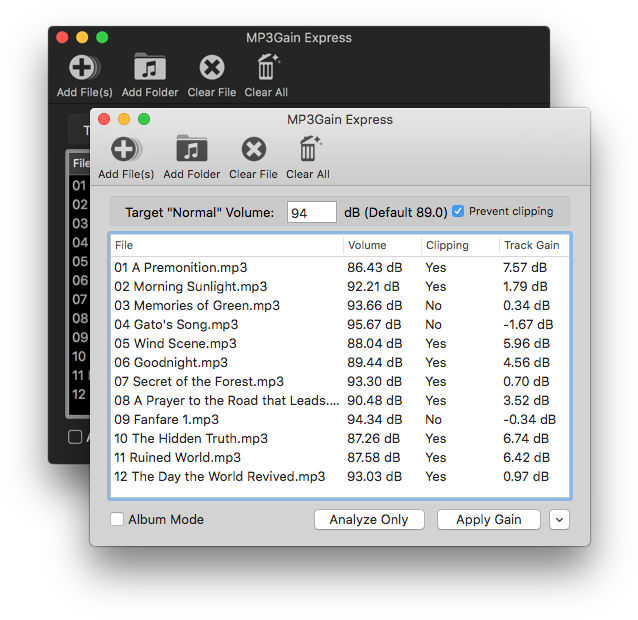
MP3Gain
Express is a port of MP3Gain and AACGain to macOS. It allows you to
analyze or apply volume gain to a list of MP3 or AAC files. Anyone who has used
the Windows UI for MP3Gain should find this one familiar, as it
was designed to look similar to that version.
It's easy to use. Simply select the files you want to increase or
decrease the volume of, enter the desired loudness, and click Apply
Gain to update your files.
Disclaimer: If you are using this program for the first time, please remember to back up your files before trying to modify them with MP3Gain. While the application should work fine for most users, differences between machines could result in problems that only affect a small number of people.
Download: mp3gain_mac25.zip (6 MB)
Requires OS X 10.11 El Capitan or later. (Pictured running
under macOS Sierra 10.12)
Last updated on February 9th 2021:
This release brings back AAC support which was accidentally omitted from the previous release.
Version History
Older version:
mp3gain_mac234.zip (4.5 MB)
For OS X 10.7 Lion or later.
Questions and Answers
What is MP3Gain?
MP3Gain is a tool to increase or decrease the volume of MP3 files
without re-encoding them. This is useful when you have a lot of music
at different volumes, you can use this tool to make everything the same
volume so that you don't need to adjust the volume on your MP3 player
when listening to your music on shuffle.
What does MP3Gain Express do?
This version of MP3Gain does three things. It can:
- Analyze MP3 files and write the volume information to a tag
without changing the audio data itself. This is useful if you have a
player that supports "ReplayGain" tags. (Not iTunes or iPods, so mostly
useless on Mac OS X)
- Apply Gain to MP3 files. This updates the audio data in the files
to apply the new volume directly to them. This is done without re-encoding
the file, so there usually is no loss in audio quality compared to
original data. (I assume that if you make the file loud enough to start
"clipping" that this would count as quality loss. The loudness of
digital audio can be represented within a range of values, and once you
go above the maximum any points above the maximum can only be
represented as the maximum itself. If the "Clipping" column shows Yes
then this situation is occurring. In some cases, depending on how loud
you go, you may not notice it. You can click the "Prevent Clipping"
checkbox to automatically use a lower value if clipping would occur.)
- Undo changes applied to MP3 files, returning them to their original
volume. This will only work if the file has previously had gain applied to it,
and undo has not been performed on the file. The undo feature cannot remove
file corruption in files that were accidentally damaged by the program.
What does MP3Gain Express not do?
MP3Gain Express omits some features of the original MP3Gain, hence
"Express" tacked onto the name.
- MP3Gain Express does not back up your files for you. As with any
application, there is a chance something could go wrong. If you've
never used the tool before, I suggest backing up your files first to
make sure it works as you intended.
- Versions of Mac OS X older than 10.6 are not supported.
- MP3Gain is for audio files only.
The .mp4 extension allowed because some AAC files use that extension, but
please do not use it for processing video files. It will not work.
Over time, several missing features were added which
may have made the original intention of the express name no longer necessary.
However, the addition of multi-threaded processing made the application faster
than the Windows front end, so now the express name may imply that it is fast.
Why port MP3Gain to Mac again, even
though a port already existed?
This port was made to fulfill one need that I had. I wanted to increase
the volume of a few tracks I had that were too quiet. I didn't need any
of the other features of the program, so they originally were not available
in this port. Over time, more features were added as a result of user requests.
I started this port a few weeks before Mac OS X 10.7 Lion was
released, and Bery Rinaldo's port had not been updated in over 3 years
so I assumed it was dead. It also wasn't compatible with Snow Leopard
at the time.
I decided to do my own port for two reasons:
- The existing port was a front-end written in AppleScript. Anyone
familiar with my previous work (MultiPatch for example) might be aware
that I prefer to call code natively and not use an external tool to do
the work. I felt that this could benefit from the increased flexibility
of a native application. This approach was eventually changed in version
2.0 in order to implement multi-threaded processing, but the existing
native UI has been retained and the application should behave as it did
when MP3Gain was integrated internally.
- The existing port was bundled with PPC binary at that time, which
would not work on Mac OS X Lion. My intention was to release the port around
the time Lion came out in order to fill that gap.
After I reached the point where it was partially working, it sat
untouched for a few months. By the time I eventually came back to it,
Bery had updated his version with Lion support. That version was also
available for a number of years, but eventually disappeared from the
internet after its website went down. This port now has the missing
features and should be useful for people who formerly used that one.
Disclaimer:
I have not actually used his port, so my comparisons are based on the information
on his website.
Is there a build of the command-line version of MP3Gain available on macOS for power users?
Yes. I am now providing a command-line build of MP3Gain with AACGain support.
This is the command-line version of AACGain 2.0.0 built for macOS 10.9 or later.
It is based on the 2.0.0 fork from Github, refer to the source repository for exact revision used.
You can download it
here.
Will this port be actively maintained
and updated?
Probably not. MP3Gain itself isn't updated often anymore (Why would it
be? It already does what it was intended to do) and I primarily wrote
this for myself to use once every few years. If this program ever breaks in a
future version of macOS, I will probably update it just so that there's
always a working port available.
What is the license?
MP3Gain is LGPL. This port is also LGPL. You can probably find more information about that license on Wikipedia.
Who else contributed to this port?
The Spanish translation was provided by Emilio Pérez Egido.
The Greek translation was provided by George Leventidis.
The German translation was provided by Hans-Juergen Merkel.
The Czech translation was provided by GVG.
The icons used in version 2.1 and later were created by George Leventidis.
There were also many users who emailed me with feedback and bug reports.
Where can I get the source code, report bugs, or request features?
There is a project on GitHub for MP3Gain Express where you can check out the current development code for the application, submit your own changes, bug reports, or feature requests. You can find it at
https://github.com/Sappharad/mp3gainOSX/.
Contact
I can be contacted via e-mail at sappharad @ [same thing
as before the @ symbol] .com.
